
Free + open source · Windows 11 and macOS
Right-click. Pick a preset. Done.
A screen recording that needs to be a GIF small enough for Discord. A ProRes export that has to become a preview MP4. Quick changes for any video or image, without having to open heavy apps. Offspring puts a wide set of tools on your right-click menu, so that daily operations with media are easier and quicker than ever.
MIT-licensed · no account, no data sharing, no pricing · v0.5.3
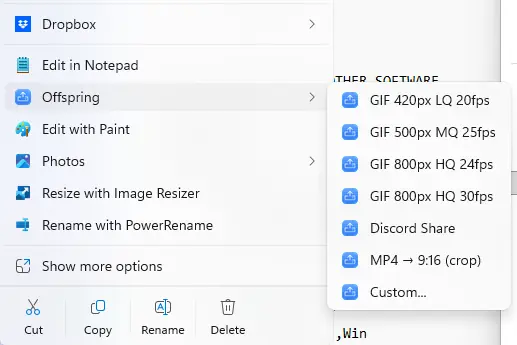
It's this simple. Your presets sit one click inside the right-click menu that was already under your cursor.
The problem
Every tool has its use
Day to day, I face a huge amount of media files: things to share, review for work, or that I send my friends on different platforms. Until now, every minor edit to a video like a speed-up or a crop would require a round-trip through a full suite app like After Effects, or DaVinci. Or I guess you could upload it to one of those dodgy websites with terrible limits and ads all over.
Offspring replaces all of that with a right-click menu and instant speed. Plus, it incorporates a lot of other tools that are not just a means to save you time but can genuinely improve your productivity and make things incredibly seamless.
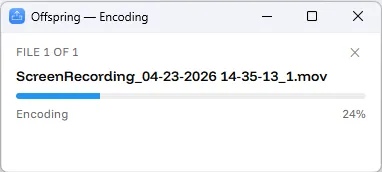
Encoding · Progress
Conversions and edits happen in a blink
No dock icon, no project to save, nothing to close. A compact always-on-top window counts through your selection file by file and closes itself when it's finished.
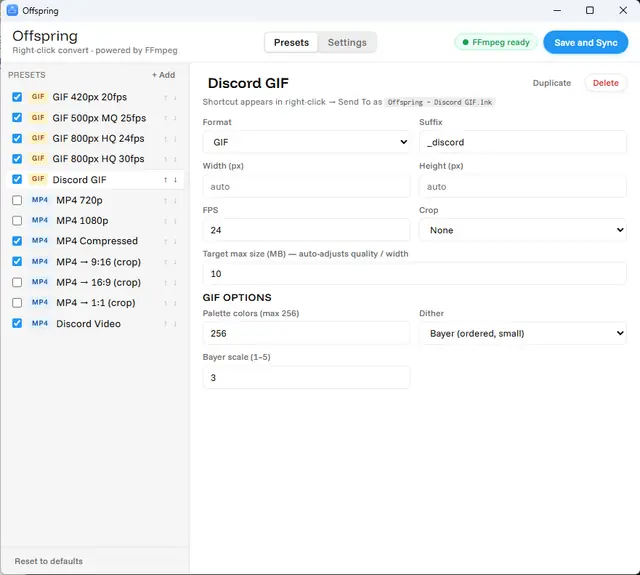
Presets · Yours
Create custom presets
By default, Offspring comes with a variety of useful presets. But its true power lies in allowing you to create custom presets for exactly what you need: a Discord-ready GIF, a compressed MP4, cropped 9:16 vertical videos, a 1080p downscale... Edit them, reorder them, and add your own.
Tools
And not just conversions
The same menu carries the small edits you'd otherwise open an editor for. Each one works on your selected files.
Trim
Frame-accurate. Strip frames off the head and tail, or cut a range out of the middle.
Modify
Crop, rotate, flip, reverse, drop the audio or speed up videos, all with a scrubbable preview of the actual file.
Compare
Two files stack side by side; three or more arrange into a grid for an A/B look.
Merge
Concatenate a selection into one file, in filename order, settings inherited from the first. Extremely useful for quick edits of multiple shots.
Overlay
Burn in filename, timecode or your own text per corner, with optional guides and a watermark to check for all aspect ratios.
Greyscale & Invert
Desaturate anything, or invert an image to a negative — handy for cleaning up masks or sending quick previews with no color.
Make Square
Pad the shorter edge to a square, transparent or matched to the corner pixel. Especially useful for textures that will deform if they're not 1:1 ratio.
Image sequences
Right-click one numbered frame and Offspring finds the rest of the sequence for you. Export as a video or directly as a GIF.
Custom, once
Need a one-off that isn't worth a preset? Tweak the settings for just this run. A window will pop up where you can customize the output settings directly.
Install
Download, install, and go!
Installing the app is very easy. Just download it for your OS and you're pretty much ready to go! For Offspring to work as intended and live in your right-click menu, there are a couple of extra steps you might need to take depending on your OS:
Windows 11
-
Download
Offspring-Setup-<version>.exeand run it. - It installs for your user alone — no admin prompt, no UAC — and the right-click entries appear straight away.
- Right-click any video or image. You're done.
Windows may show a SmartScreen notice — there's no paid Authenticode certificate behind this. More info → Run anyway. Optionally turn on the Windows 11 top-level menu (no "Show more options") from Settings.
macOS
-
Download the
.dmgand drag Offspring to Applications. - Launch it once. It's signed and notarized, so Gatekeeper lets it through.
- Turn the Finder integration on: System Settings → Keyboard → Keyboard Shortcuts → Services → Files and Folders and tick Offspring…
That third step is macOS being macOS — it hides newly-installed services by default. After it, Offspring lives in Finder's right-click → Services menu.
On first launch Offspring fetches a small FFmpeg build into its own folder if you don't
already have one — or point it at the FFmpeg you've got
(/opt/homebrew/bin/ffmpeg, say) in Settings.
FAQ
Frequently asked:
Do I need to install FFmpeg myself?
No. If there isn't one on your machine, Offspring offers to download a build into its own per-user folder — about 80 MB on Windows, a universal static build on macOS — and verifies its SHA-256 before unpacking it. If you already have FFmpeg, point Settings at it and nothing gets downloaded at all.
Does anything get uploaded?
No. There's no analytics, no telemetry, and the app makes zero outbound requests on its own. It's a double-edged sword, because it means that I don't get information when/if the app crashes or misbehaves, but I wanted Offspring to be as non-intrusive as possible. The only three network calls that exist are ones you click: the FFmpeg download, an update check, and the update download that follows it. Your files are only ever read from and written to the folder they live in.
Where does the converted file go?
Right next to the original, with a suffix from the preset — so
clip.mov becomes clip_discord.gif in the same folder.
Nothing is overwritten unless you explicitly ask the Modify tool to.
Can I convert several files at once?
Yes — select as many as you like and pick a preset once. The progress window walks the list. Merge and Compare are the tools that treat the selection as a group rather than one-by-one.
What formats does it handle?
Whatever FFmpeg reads, which is nearly everything — including ProRes, DNxHD and awkward MKVs. Output is MP4, GIF, or a still image as PNG, JPEG, WebP or AVIF.
What's the "Studio" build on the releases page?
The same app with every outbound code path compiled out — no FFmpeg downloader, no update check, no certificate handling. For locked-down machines where an app that could reach the network is the problem. You supply FFmpeg yourself.
Is FFmpeg bundled into it?
No — Offspring calls FFmpeg as a separate executable and never links against it, so FFmpeg's LGPL doesn't propagate. FFmpeg is © the FFmpeg developers under LGPL v2.1+; Offspring itself is MIT.
Put it in the menu and forget about it
That's the whole idea. You stop thinking about conversion as a task with a beginning and an end, and it becomes a thing you do in passing.